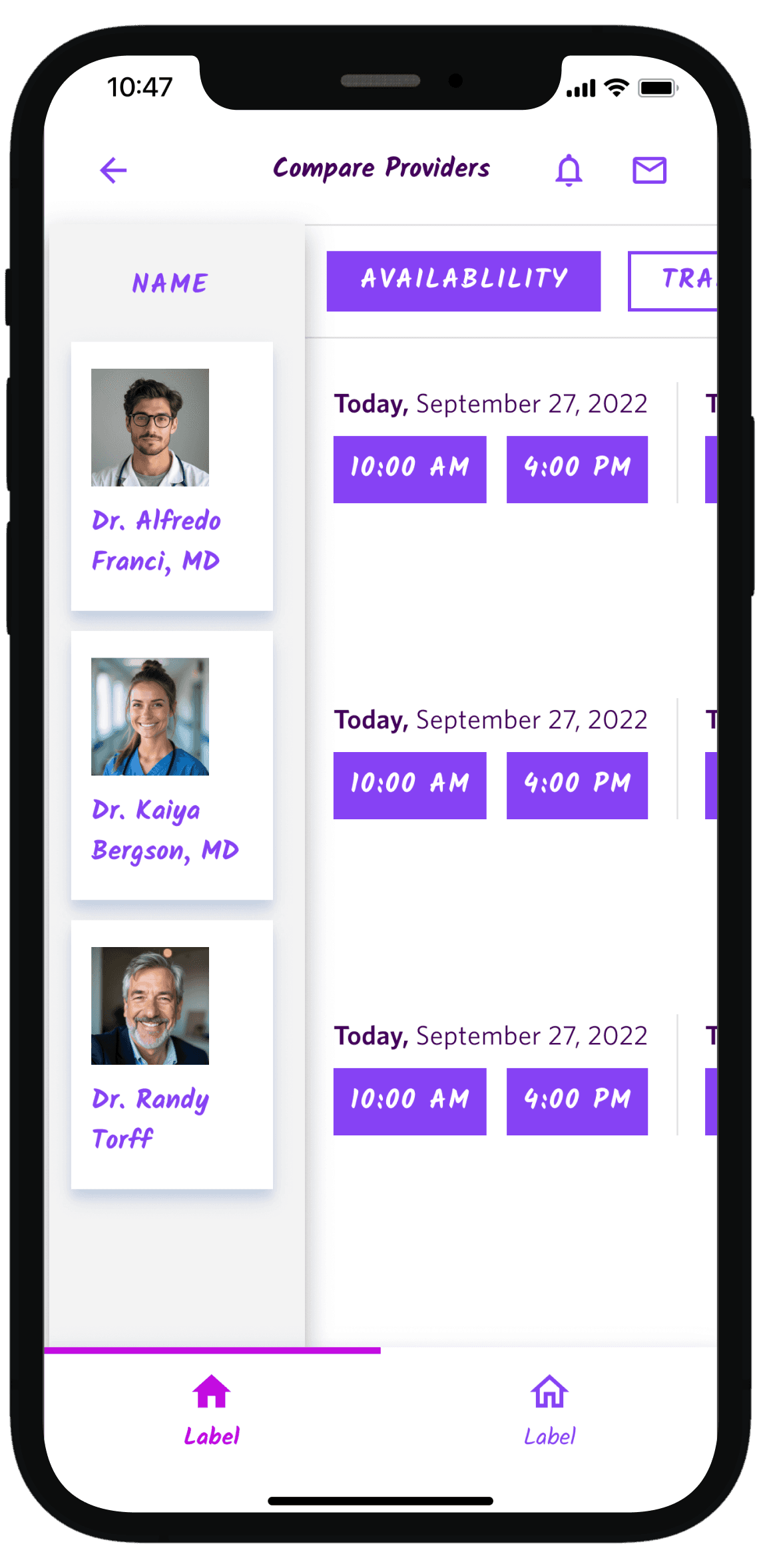
Designed a provider comparison tool to reduce decision-making time and increase appointment bookings

Designed a provider comparison tool to reduce decision-making time and increase appointment bookings

Figma Prototyping

Figjam

Design System

42%

users who viewed 3+ providers used the comparison tool

23%

higher appointment booking rate

35%

reduction in time from search → appointment booking

CHALLENGE

Patients often struggle to find and compare healthcare providers due to fragmented information and the overwhelming number of options available.

DURATION

4 Weeks

MY ROLE

Lead product designer

TEAM

Jennie Lee - Sr. Product Designer

Nirali Shah - Sr. Product Designer

Design systems team

PRIMARY GOAL

How might we help patients compare providers on the factors that drive their decision so they can book appointments with more confidence on the go?

Decision fatigue

too many options, no clear way to compare

Prolonged sessions

average 8+ minutes from search to booking

Abandoned flows

users left without booking when overwhelmed

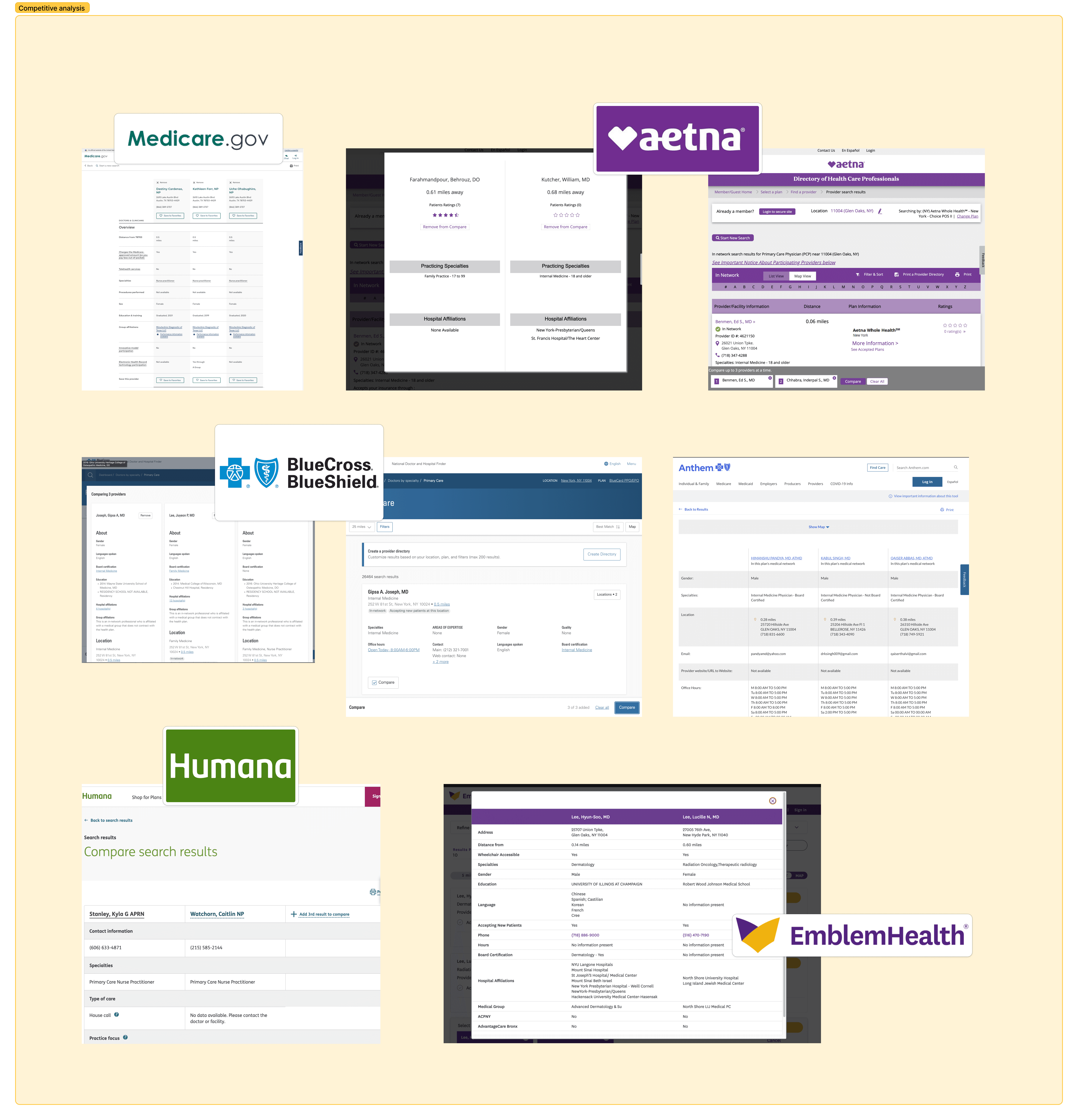
COMPETITOR ANALYSIS

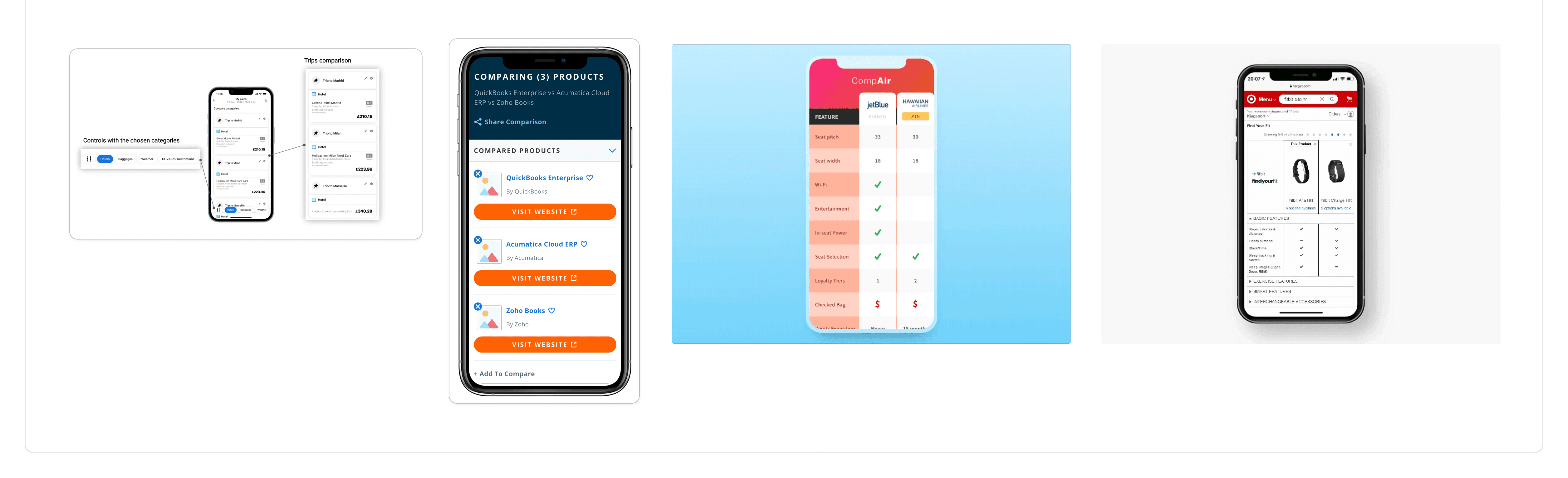
I found comparison tools on every competitor site, all desktop-only, while 60% of our users were active on mobile app
OPPORTUNITY

Mobile comparison tools existed in other SaaS products, bringing them to healthcare would differentiate us and solve a real user pain point
RESEARCH AND BRAINSTORMING

I conducted a collaborative session to rank the decision making factors for a user based on existing research and human mental model to avoid bias

DESIGN THINKING AND EARLY EXPLORATIONS

I then tested wireframes with users to understand what type of mobile scrolling behavior worked before investing in high-fidelity designs and component building

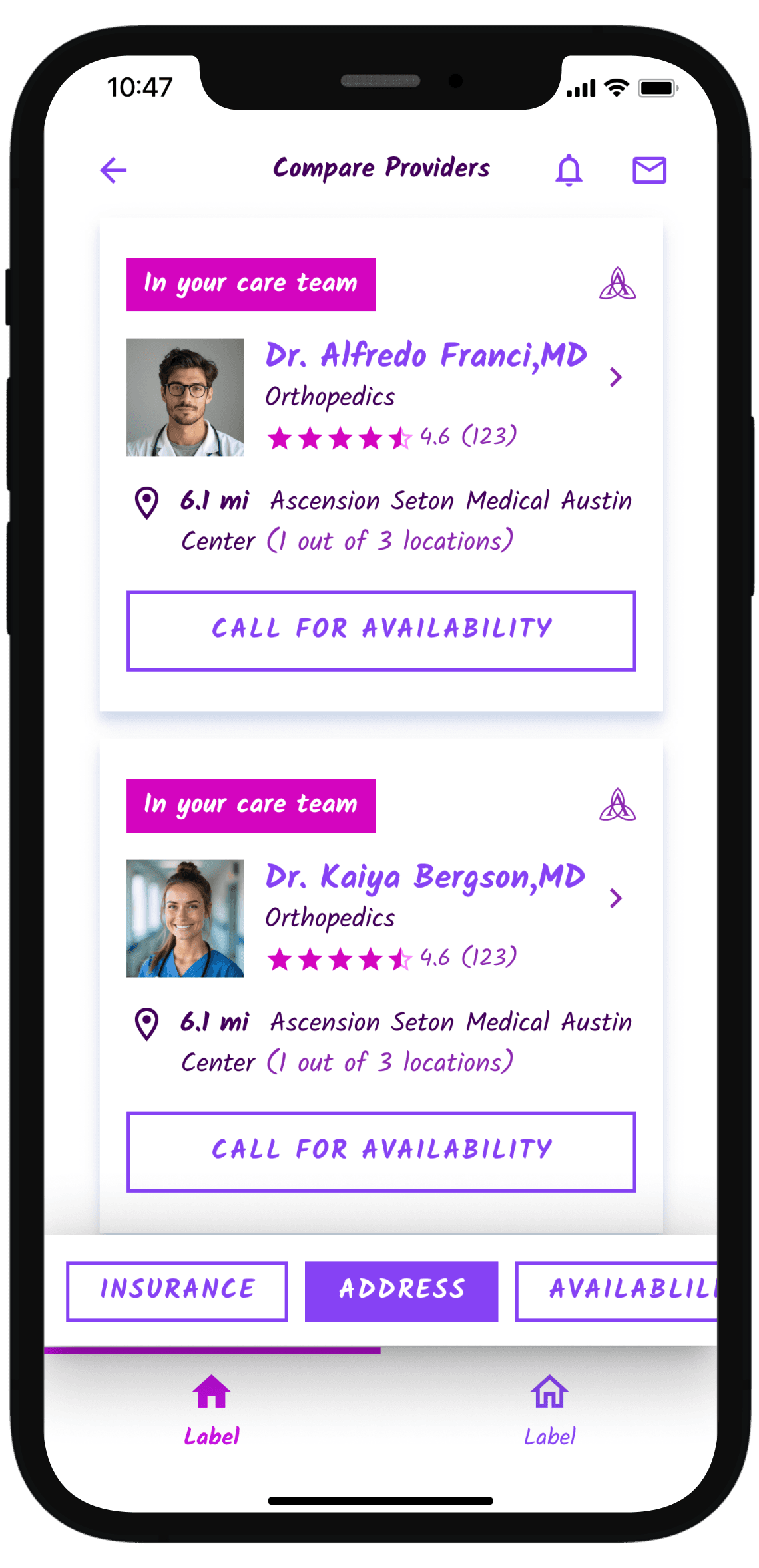
DIRECTION 1

Selected Category View

Familiar pattern since users already understood provider cards from search results

Minimal layout changes from existing UI so low engineering lift

Users could only view one category and one card at a time

Sequential comparison requires user to scroll up and down to see older cards
DIRECTION 2

Vertical Provider Cards

Could display multiple providers in one view

Restricted scrolling space

Users could only view one category at a time

Forced users to remember previous category data while switching tabs

DIRECTION 3

Horizontal Provider Cards

Showed all categories for one provider in full detail

Clean, focused view per provider

Restricted scrolling space

Could only see one provider at a time, no actual side-by-side comparison

Required swiping back and forth to compare two providers
FINAL DECISION

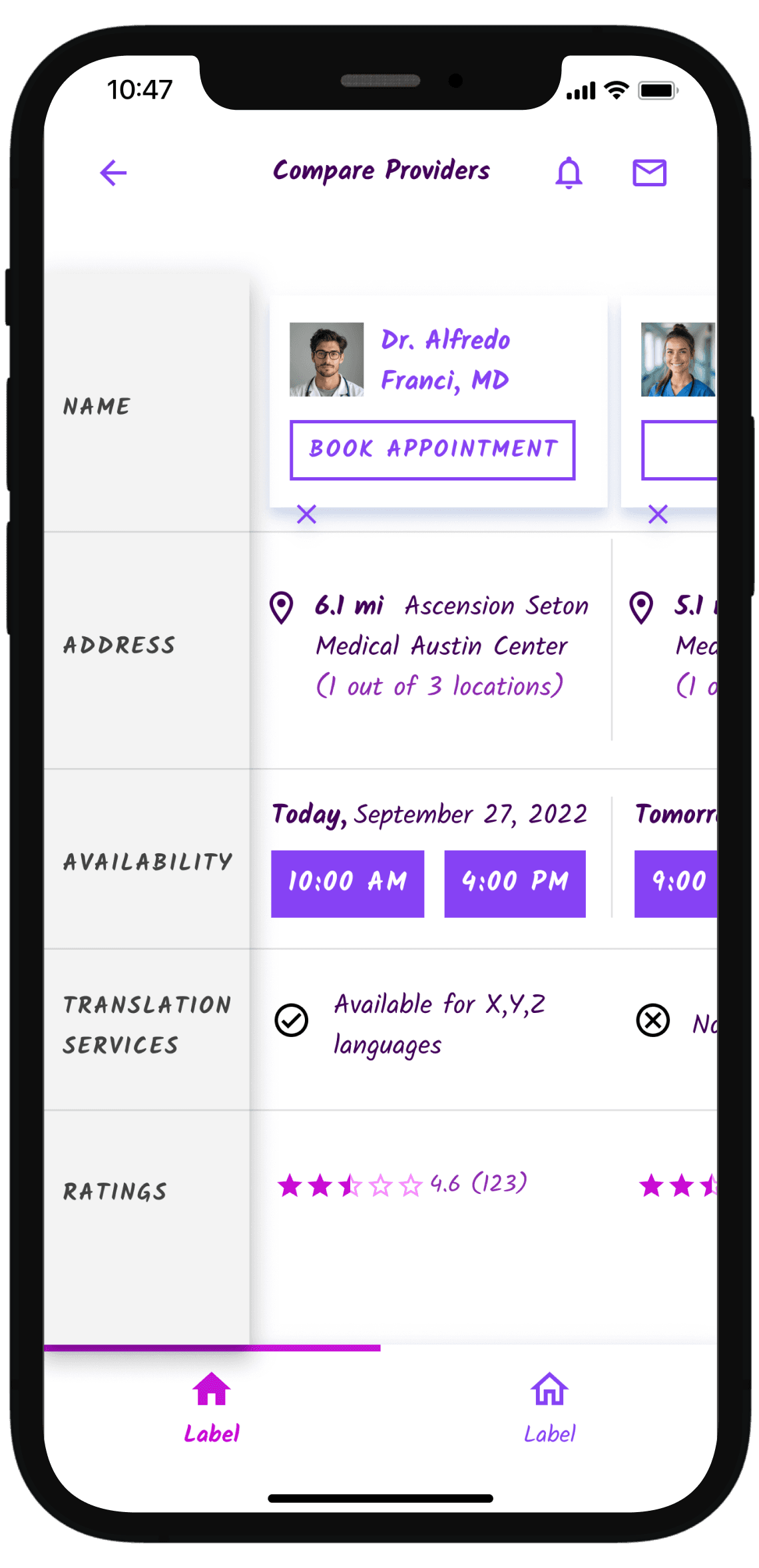
Side-by-Side Grid with Horizontal and Vertical Scroll

Familiar table comparison pattern followed by apps like Amazon and Best Buy

Users could see at least 2 providers at once

Horizontal + vertical scroll allowed flexible navigation

Scalable for 2, 3, or 4 providers

CHALLENGES

Here are some sonstraints that shaped the solution

No existing table component

Our design system had no table component.

I needed a scalable, accessible table that worked across mobile and desktop, supported dynamic columns (2-4 providers), and handled incomplete data gracef

Audited multiple healthcare and SaaS products with comparison features (Zocdoc) to identify key patterns and presented findings to design system team with use cases beyond provider comparison

No existing table component

Our design system had no table component.

I needed a scalable, accessible table that worked across mobile and desktop, supported dynamic columns (2-4 providers), and handled incomplete data gracef

Audited multiple healthcare and SaaS products with comparison features (Zocdoc) to identify key patterns and presented findings to design system team with use cases beyond provider comparison

Creating scrollable prototype

Getting stakeholder approval and engineering buy-in required a working prototype

Standard Figma prototypes didn't support bidirectional scrolling (horizontal + vertical). Collaborated with design systems team, senior designers, engineering and AI to brainstorm workarounds.

Spent time undertanding nested scrollable frames: vertical scroll for providers, horizontal scroll for categories, and sticky column headers using fixed positioning constraints.

Creating scrollable prototype

Getting stakeholder approval and engineering buy-in required a working prototype

Standard Figma prototypes didn't support bidirectional scrolling (horizontal + vertical). Collaborated with design systems team, senior designers, engineering and AI to brainstorm workarounds.

Spent time undertanding nested scrollable frames: vertical scroll for providers, horizontal scroll for categories, and sticky column headers using fixed positioning constraints.

Creating scrollable prototype

Getting stakeholder approval and engineering buy-in required a working prototype

Standard Figma prototypes didn't support bidirectional scrolling (horizontal + vertical). Collaborated with design systems team, senior designers, engineering and AI to brainstorm workarounds.

Spent time undertanding nested scrollable frames: vertical scroll for providers, horizontal scroll for categories, and sticky column headers using fixed positioning constraints.

Balancing multiple stakeholders

Hospitals wanted their providers highlighted, Providers wanted ratings shown only if 4+ stars.

Audited objective vs. subjective fields through collaborative workshop and created visual hierarchy that balanced needs without bias

Balancing multiple stakeholders

Hospitals wanted their providers highlighted, Providers wanted ratings shown only if 4+ stars.

Audited objective vs. subjective fields through collaborative workshop and created visual hierarchy that balanced needs without bias

IMPACT

Beyond product impact mentioned below, the comparison table component was adopted by 3 other teams, becoming a core design system pattern

42%

users who viewed 3+ providers used the comparison tool

23%

higher appointment booking rate

35%
reduction in time from search → appointment booking